I Turned a Reddit Thread Into a Website Using ChatGPT. This Is How.
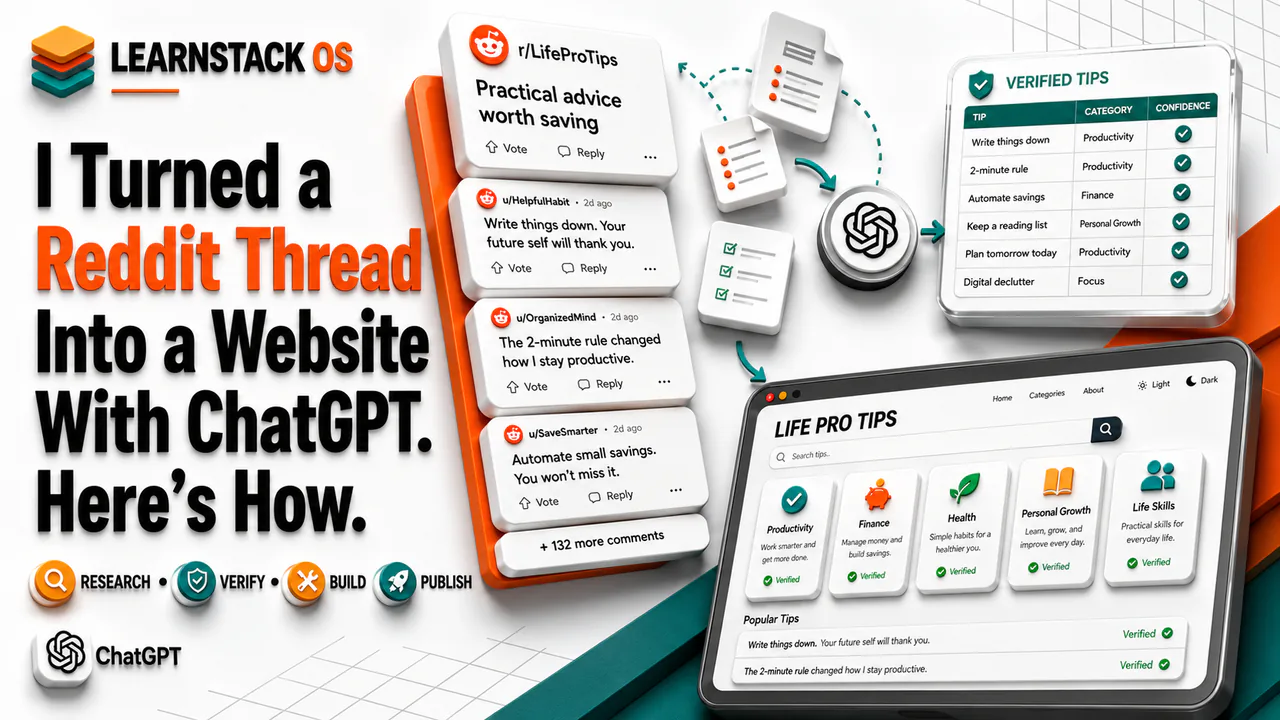
I wanted to see whether a scattered Reddit discussion could become something more useful than a long list of comments. So I used ChatGPT Work to research, verify, organize, and review advice from Reddit, then used Sites to turn the approved information into a searchable website. This article explains the process, what I learned, and how you can use the same approach for your own project.
You do not need to be a programmer to turn an interesting research idea into a useful website. You need a clear question, dependable sources, and a careful review process.
ChatGPT Work and Sites can help with each part of that process.
ChatGPT Work is designed for tasks that have several steps and produce a finished result. It can research websites, review files, organize information, create spreadsheets, and prepare other files for you to inspect. Sites can turn that work into a hosted website that people can open through a normal web link.[1][2]
This article will show you how to use both for a simple do-it-yourself project. We will use a real : collecting useful advice from Reddit, checking it, organizing it, and publishing it as a searchable website.
The same process can work for many other ideas. You could research free learning resources, local hiking trails, small-business tools, public grants, recipes, historical landmarks, or software for a specific profession.
The Project We Built
The starting idea was simple: Reddit’s r/LifeProTips community contains thousands of suggestions, but the useful information is spread across posts, comments, and nested replies.
Reading all of it takes time. Some tips are repeated. Some are outdated. Others sound convincing but are not correct.
The project used ChatGPT Work to:
Review Reddit posts, comments, and nested replies.
Separate comments that contained several different tips.
Remove duplicate suggestions.
Place each tip into a useful category.
Find the official website for each named app or service.
Check important claims against current sources.
Assign a confidence level.
Create an Excel spreadsheet.
Convert the approved information into a standalone HTML page.
HTML is the standard language used to structure a web page. A standalone HTML file contains the page content, design, and basic features in one file.
Sites was then used to publish the finished page. The result was a searchable collection with category filters, collapsible sections, and light and dark display modes.
You can view the example here:
https://life-pro-tips-from-reddit.thebpandey.chatgpt.site
Why Use ChatGPT Work Instead of a Normal Chat?
A normal ChatGPT is useful when you need an answer, an explanation, or a short draft.
ChatGPT Work is better when you want a completed result that requires several actions. It can work through a larger , use approved tools, create files, and give you progress updates while it works.[1]
Think of the difference this way.
If you ask, “What are five useful travel tips?” a normal chat can answer the question.
If you ask, “Review 200 travel tips, check their claims, remove duplicates, organize them in a spreadsheet, and create a website,” you have described a work project.
ChatGPT Work is a better fit for the second request.
Research Is More Than Collecting Information
Finding information is only the first part of research. You must also decide whether the information is trustworthy and useful.
A source is the original place where information comes from. It can be a government website, research paper, product page, professional organization, news report, forum post, or personal comment.
These sources do not have equal value.
For example, a Reddit comment may say that a certain action will improve your health. The comment can help you discover the idea, but it should not be the only evidence. Ask ChatGPT to check the claim against guidance from a public-health agency, medical organization, university, or research publication.
The same rule applies to software. If someone recommends an app, ask ChatGPT to find the product’s official website. Do not rely only on a blog that describes the app.
ChatGPT can make mistakes. It can also misunderstand a source or connect a claim to a page that does not support it. You must review important findings before you publish them.
Let’s Build It
Follow these steps to create your own research website.
1. Choose a focused subject
Start with a topic that has a clear boundary.
“Research useful websites” is too broad.
“Research free websites that help high-school students learn mathematics” is much better.
Write down:
The subject you want to study.
Who will use the results.
What information each result must contain.
What should be excluded.
How you will decide whether a claim is dependable.
For our Reddit project, each record needed a title, category, explanation, instructions, benefit, source URL, Reddit URL, and confidence level.
2. Create a ChatGPT Project
A ChatGPT Project keeps related chats, files, instructions, and sources together. It is useful when your work will continue across several sessions or produce several files.[3]
Create a new Project and give it a clear name. Add any starting documents, links, or instructions.
You could name your project “Free Math Learning Resources” or “Houston Weekend Hiking Guide.”
Use separate chats for research, review, writing, and website changes. This keeps each conversation focused while the Project keeps the shared .
3. Start ChatGPT Work
Switch from Chat to Work.
If your version offers local and cloud work, choose based on the task. Local work is useful when ChatGPT needs files or applications on your computer. Cloud work can continue without your computer staying awake.[1]
Availability and controls can depend on your ChatGPT plan and workspace.
4. Give ChatGPT a clear research brief
Your first should describe the outcome, sources, , and required file.
For example:
Review highly rated posts and comments in r/LifeProTips. Extract each distinct piece of advice as a separate record. Group the advice into broad categories. For every record, include a simple explanation, its practical benefit, the Reddit source, a supporting source, and a confidence level. Remove duplicates and unsupported claims. Create an Excel spreadsheet for my review.
This prompt tells ChatGPT what to research and how to present the result.
Do not ask it to “find everything useful.” Words such as “useful” and “reliable” need rules. Define them.
5. Ask for traceable research
Traceable research lets you follow a claim back to its source.
Ask ChatGPT to include:
The original source URL.
The supporting source URL.
The date of the review.
A short note.
Any limits or exceptions.
A confidence rating.
For a product recommendation, request the official product URL and a short description based on the official site.
For health, legal, financial, or safety advice, require authoritative sources and careful wording. Do not publish strong claims based only on comments or personal stories.
6. Research in manageable rounds
Large projects work better in stages.
Ask ChatGPT to collect an initial batch. Review it before asking for hundreds of additional records.
You can then say:
Review the first 50 records. Remove duplicate advice, identify unsupported claims, and list any source links that do not support the description.
A staged process makes errors easier to find. It also gives you a chance to improve the rules before ChatGPT repeats a weak pattern across the whole dataset.
7. Review the spreadsheet
Ask ChatGPT Work to create a spreadsheet with clear columns. ChatGPT can generate spreadsheets that you can preview, refine, and download.[4]
Useful columns include:
Category
Recommendation
Plain-English explanation
Benefit
Instructions
Original source
Supporting source
Confidence level
Verification note
Open several links yourself. Review a sample from every category. Check all high-risk claims.
Also look for advice that appears different but means the same thing. “Wash clothes in cold water” and “Use the coolest effective laundry setting” may be one tip, not two.
8. Prepare the website request
After you approve the research, ask Sites to build the website.
Your prompt can say:
Create a clean website from the approved spreadsheet. Group the records into collapsible categories. Add a search bar, category filter, Expand All button, Collapse All button, and light and dark modes. Show only High- and Medium-confidence records. Make the page easy to use on phones and desktop computers.
Include the audience, purpose, content, and required behavior. These details help Sites create a more suitable first version.[2]
9. Review and refine the page
Do not publish the first version without checking it.
Test:
Search results.
Category filters.
Expand and collapse controls.
All source links.
Mobile spacing.
Text size and contrast.
Light and dark modes.
Long descriptions.
Empty or missing fields.
Ask for specific changes. For example, say, “Keep the three control buttons on one line on mobile,” instead of saying, “Make the mobile design better.”
10. Publish the website
When the page is ready, ask Sites to publish it and provide the public URL.
Sites can create, host, refine, and share a website without a separate deployment system. It is currently offered as a public beta on supported ChatGPT plans, with plan-specific limits.[2]
Remember that a Sites deployment is a production deployment. Production means the published version is live for its approved visitors. If you want another review before it goes live, ask ChatGPT to save a version without deploying it.[2]
Best Practices to Keep
Give ChatGPT a precise goal. Define what a complete result must contain.
Require source URLs. A polished paragraph is not proof that a claim is correct.
Separate collection from verification. First find candidates. Then review, correct, and remove them.
Keep the original data. The spreadsheet gives you an audit trail and makes future updates easier.
Use confidence levels carefully. “High confidence” should mean that reliable evidence supports the qualified claim. It should not mean that the original post received many votes.
Review sensitive claims yourself. Health, financial, legal, and safety information can cause real harm if it is wrong.
Finally, treat the website as a maintained resource. Sources change, apps close, and advice becomes outdated. Add a review date and schedule future checks if the subject changes often.
A Small Project Can Teach a Large Skill
The important lesson is not how to build a Reddit-tip website. The important lesson is how to turn unorganized public information into a structured and useful resource.
ChatGPT Work can help with the research, organization, verification, and file creation. Sites can turn the approved result into a website that other people can use.
You remain the editor. You choose the rules, inspect the evidence, correct mistakes, and approve publication.
Start with one subject you already care about. Keep the first version small. Review it carefully. Then improve it through clear follow-up requests.
That is enough to turn a simple question into a useful research project and a real published website.
OpenAI, “Get started with ChatGPT Work.” https://learn.chatgpt.com/docs/get-started-with-work
OpenAI, “Sites.” https://learn.chatgpt.com/docs/sites
OpenAI, “Projects and chats.” https://learn.chatgpt.com/docs/projects
OpenAI, “Work with files.” https://learn.chatgpt.com/docs/artifacts-viewer
OpenAI, “Browser.” https://learn.chatgpt.com/docs/browser