What Is an AI Skill? The Five-Minute Way to Stop Repeating Yourself
The word “skills” is showing up everywhere in AI right now.
You may have seen people talking about SKILL.md files, custom Claude skills, ChatGPT skills, or some magical workflow they built that supposedly does half their job. If you are new to AI, that can sound like one more technical thing you were supposed to learn while also doing your actual work, answering emails, making dinner, and pretending your inbox is under control.
The good news is that an AI skill is not that complicated.
A skill is simply a saved way of doing a repeatable .
That is it. No lightning bolt. No secret developer club. No need to wear a black hoodie and stare at six monitors.
If you keep asking AI to do the same kind of work over and over, you probably already have a skill. You just have not written it down yet.
The Problem: You Keep Starting Over
Here is how most people use AI today.
You open ChatGPT or Claude. You paste in a messy task, like meeting notes, a customer email, a rough article draft, or a project update. Then you explain what you want.
You say who the audience is. You explain the tone. You mention what to avoid. The AI gives you something close, but not quite right. You correct it. It tries again. You fix the same three things you fixed last week.
Then you close the tab.
Next week, you do the same thing again.
The you typed was only the surface. The valuable part was the workflow underneath it: the tone you wanted, the structure you preferred, the mistakes you corrected, and the you had in your head.
That hidden workflow is the part worth saving.
What a Skill Really Is
A prompt is what you ask AI right now.
A memory is a fact the AI may remember about you, such as your name, your company, or your writing preferences.
A skill is different. A skill is a saved workflow for a specific type of task.
Think of it like a recipe.
A prompt is saying, “Make dinner.”
A memory is the AI remembering, “You do not like mushrooms.”
A skill is the full recipe: ingredients, order of steps, cooking method, what not to do, and what the finished meal should look like.
In AI , a skill usually contains instructions that tell the AI when to use the skill and how to perform the task. More advanced skills may include examples, reference files, templates, or even code the AI can run. Anthropic describes Claude skills as folders that contain a SKILL.md file, and that file tells Claude when the skill should be used and what instructions to follow.[1] OpenAI describes ChatGPT skills in a similar way, as reusable instructions and resources for completing a workflow consistently.[2]
For a beginner, though, the simple version is enough:
A skill is your preferred way of doing one repeated job, saved so you do not have to explain it from scratch every time.
A Real Example
Suppose every Friday you turn rough meeting notes into a status update.
Without a skill, you might keep typing a long prompt like this:
“Turn these notes into a short weekly update. Start with decisions. Then list action items by owner and due date. Then list open questions. Keep it plain. Do not add fake deadlines. Do not make it sound too corporate.”
That is not just a prompt anymore. That is a workflow.
Here is what that skill might look like in plain English:
Task: Turn raw team-sync notes into a short weekly status update.
Use when: I paste meeting notes after a team sync.
Work from: My pasted notes and, when available, last week’s update for format.
Follow this structure: decisions first, then action items with owners and dates, then open questions, grouped by project.
Never do this: Do not include side chatter. Do not invent dates. Do not use corporate filler.
Done when: Someone who missed the meeting can understand what happened and what to do next without asking me follow-up questions.
That is a skill.
It is not fancy. It is useful.
How to Make Your First Skill
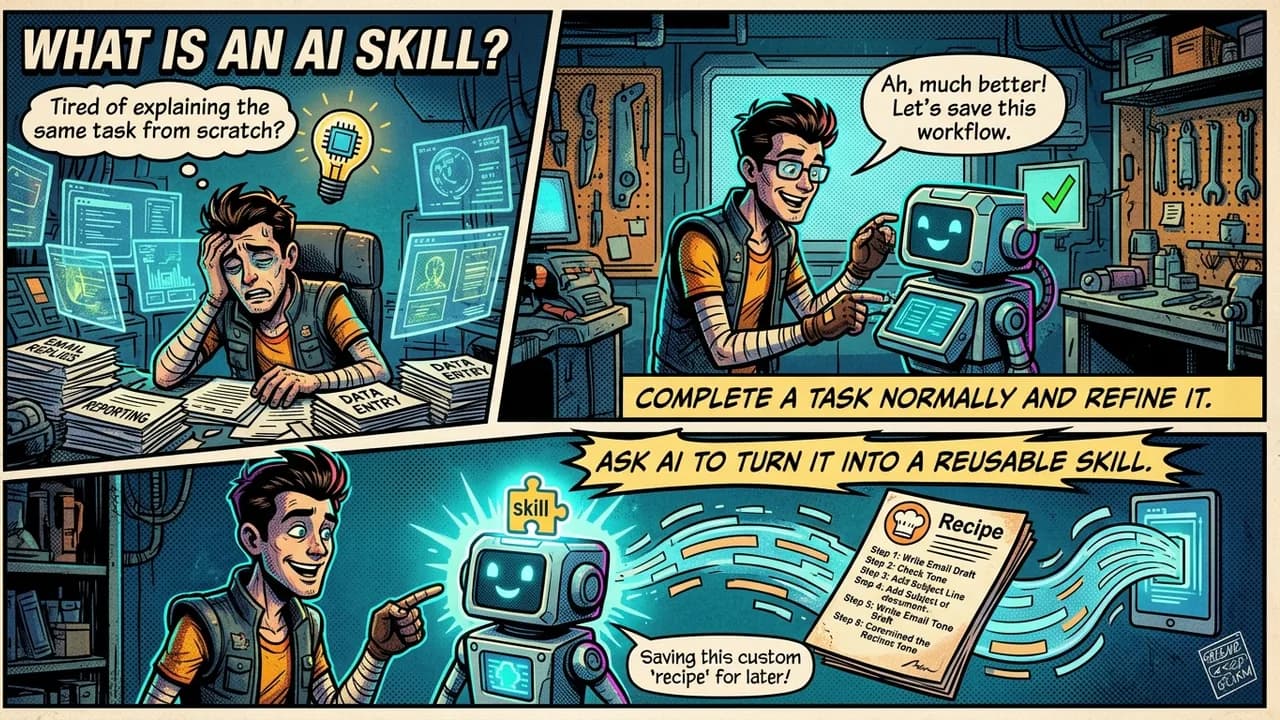
The easiest way to make a skill is to let the AI help you build it from a real .
Start by doing the task normally. For , paste your rough meeting notes and ask the AI to turn them into a clean update. Then correct it until the result is right.
Once the final version looks good, say:
“Turn what we just did into a reusable skill.”
The AI can review the conversation, pull out your instructions, notice the corrections you made, and draft the skill for you. In tools that support saved skills, you can then save it and reuse it later.
If you do not already have a good conversation to work from, use this starter prompt:
“I want to turn a task I do repeatedly into a reusable AI skill. Interview me one question at a time. Ask what the task is, when I use it, what information you should work from, what steps you should follow, what you should never do, and what a good finished result looks like. After you have enough detail, write a short plain-language skill I can save and reuse.”
That prompt is not the skill. It is the interview that helps you create the skill.
The Skills You Already Have
This is the part that makes skills easier than they sound.
You already have them.
If you always rewrite customer emails in a certain tone, that is a skill.
If you always turn messy notes into a clean summary, that is a skill.
If you always ask AI to review an article for clarity, tone, structure, and missing examples, that is a skill.
If you always ask AI to turn a project idea into a plan with risks, steps, and success criteria, that is a skill.
The only difference is that right now, those rules live in your head. So every time you need the work done, you have to explain them again.
Writing a skill moves that workflow out of your head and into a reusable form.
That matters more as AI agents become more common. An is an AI system that can take multiple steps toward a goal, often using tools along the way. If you give an agent vague instructions, it may produce vague work. If you give it a clear skill, it has a better chance of following your preferred way of working.
The Catch: Skills Can Scatter
There is one practical problem nobody should ignore.
A skill is only useful if you can find it later.
Some skills may live inside Claude. Some may live inside ChatGPT. Some may sit in a folder as SKILL.md files. Some may be buried in old chats. Some may be downloaded, copied, edited, or shared across tools that support compatible skill formats.
That portability is powerful, but it can also create clutter. OpenAI says its skills follow the Agent Skills open standard, and Anthropic has described Agent Skills as an open standard for cross-platform portability.[2][3] Microsoft also documents Agent Skills and notes that file-based skills can be discovered from SKILL.md files.[4]
Still, “portable” does not always mean “perfectly managed for you.”
You need a place to keep your best versions. Otherwise, the skill you actually trust may end up hiding in the same digital junk drawer as old downloads, mystery screenshots, and documents named “final_final_REAL_final.”
A simple folder called “AI Skills” is enough to start. Later, you can organize by work area, such as writing, customer support, operations, research, or project management.
The Simple Version
Do not overthink your first skill.
Watch for the task you explain to AI more than twice. That is your signal.
The next time you finish that task successfully, ask the AI to turn the process into a reusable skill. Save it. Use it again. Improve it when you notice a missing rule or a better example.
That is how this compounds.
The future skill is not memorizing the perfect prompt. It is learning how to capture the way you work so AI can repeat it more reliably.
Start with one task. Write down the rules. Save the workflow.
That is your first AI skill.
Sources & References
[1] Anthropic. “Creating custom skills” and “Skills overview.” Claude documentation.
[2] OpenAI. “Skills in ChatGPT.” OpenAI Help Center.
[3] Anthropic. “Introducing Agent Skills.” Claude by Anthropic.
[4] Microsoft. “Agent Skills.” Microsoft Learn.